Smooth handovers
If you regularly add Monocle to client sites, also read the Agency Portal introduction.
When building websites for clients, there comes a point where you hand the site over. One of the things that needs to be included in that handover is access to the Monocle Search admin interface.
To make that process as simple as possible, we recommend adding Monocle through the Squarespace OAuth flow rather than through an account created with an email address and password. In practice, that means clicking the Add to Squarespace button:

When you add Monocle this way, the account is associated with the site itself rather than with any one individual. As soon as your client has access to the site in Squarespace, they will also be able to log in to the Monocle admin interface.
What about accounts created with email and password?
If you have already integrated Monocle Search using an account created with an email address and password, the simplest handover option is usually to change the email address on the account to one that belongs to your client:
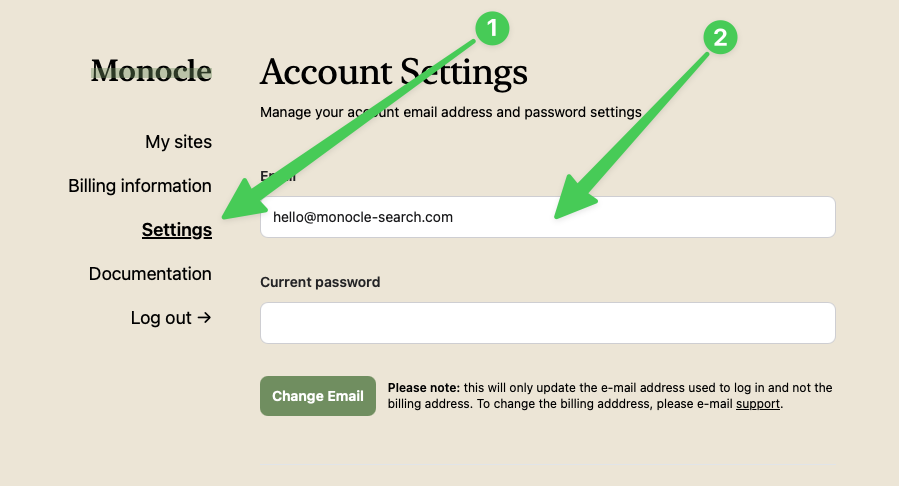
Your client can then use the password reset flow to gain access to the account. Please note that if a subscription is already set up, invoices will still be sent to the original billing email address. Please contact support to have the billing address updated.
If possible, we recommend setting the account up again using the Squarespace OAuth flow. To do that, you will first need to delete the site from the traditional account. Please also remember to remove the Monocle Search script you added using Code Injection.